Why phone photos of handwriting are hard to trace
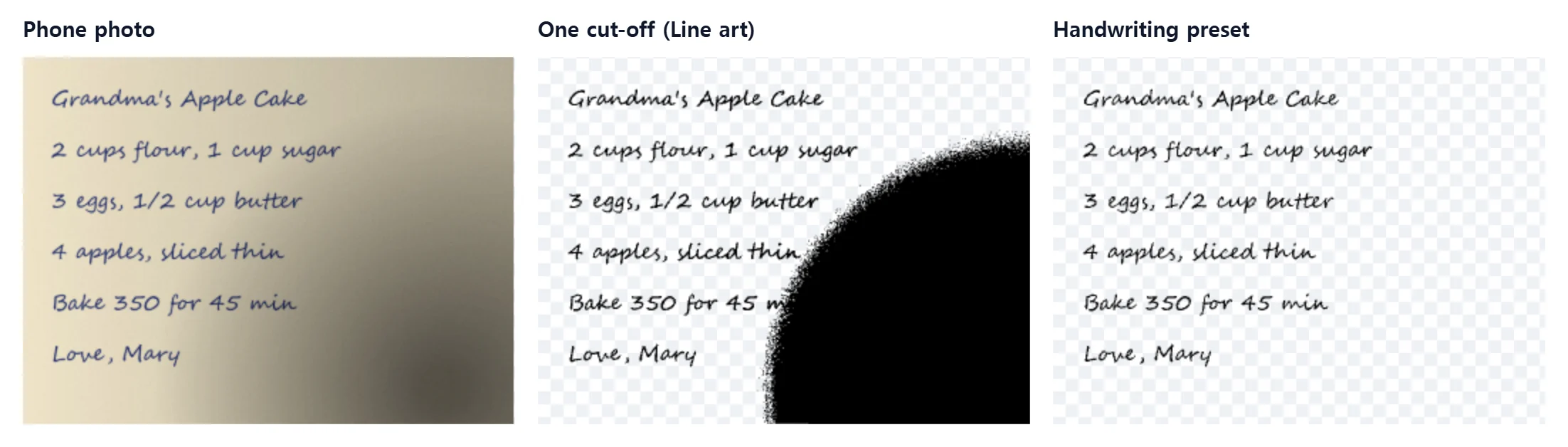
A simple black and white converter picks one brightness cut-off for the whole picture. On a phone photo the paper is rarely evenly white: the phone casts a shadow, one corner is darker, and an old recipe card has turned yellow. With one cut-off, either the dark corner turns into a black blob or the faint letters in the bright part disappear.
The Handwriting preset first measures how bright the paper is in each part of the photo and evens it out, then separates ink from paper. In our test page with light falling off into a dark corner, it kept the strokes in the dark corner, while the plain Line art preset filled in the shadowed part of the page, so its traced area came out about seven times larger than the writing itself.
Step 1: photograph the handwriting
- Lay the paper flat next to a window in daylight. Avoid direct sun on the page.
- Hold the phone straight above the page so the lines are not slanted. A little shadow is fine; the preset evens it out.
- Fill the frame with the writing and turn off the flash, which leaves a bright spot.
- A flatbed scan is even better for old or fragile cards. 300 to 600 dpi is plenty.
Step 2: convert it to SVG
- Drop the photo above. The Handwriting preset is already selected.
- Move Threshold until letters are complete and the paper is clean. Move it right if strokes break up, left if paper grain shows as dots.
- Lower Detail if small specks from stains or paper texture remain.
- Set Output width in millimeters or inches for the board, card or decal you are making.
- Download the SVG, or the EPS for older design programs. Both are free.
Handwritten recipe on a cutting board
Engraving a family member's handwritten recipe on a cutting board is one of the most common uses. The usual path is:
- Convert the recipe card with the steps above. Crop out the card border first if it is darker than the paper.
- Import the SVG into LightBurn, xTool Creative Space or the Glowforge app and set the layer to engrave (fill), not cut.
- Scale it to the board. A recipe card usually fits a 30 to 40 cm board. Check that the thinnest strokes are still at least about 0.3 mm wide.
- Test on scrap wood of the same kind before the real board.
More machine settings are on SVG for laser engraving.
Other things people make from handwriting
- Letters and notes from loved ones engraved on jewelry, keepsake boxes or ornaments.
- Kids' first writing cut from vinyl for a mug or a wall decal.
- Hand lettering and quotes for shirts, signs and stickers. See PNG to SVG for Cricut for Design Space tips.
- A signature for stamps and engraving. Signature to SVG covers that in detail.
Honest limits
- Outlines, not single lines. The SVG holds the filled shape of the ink. A Cricut pen or a plotter follows both edges of each stroke. That is right for engraving, vinyl and print, but it is not a single-line font.
- Ruled or grid paper. Printed lines that are as dark as the ink are traced too. Pale blue rules usually drop out when you move Threshold left; dark lines have to be removed in an editor afterwards.
- Very faint pencil may break up. Use a scan instead of a photo, or a higher-resolution image.
- Large filled shapes such as a solid black drawing fade in the middle with this preset, because it treats wide dark areas as shadow. Use Line art for those.
Frequently asked questions
How do I turn handwriting into an SVG for free?
Photograph or scan the handwriting, drop the image into the converter with the Handwriting preset, move Threshold until the letters are complete and the paper is clean, and download the SVG. It is free and needs no sign-up.
My photo has a shadow across the page. Will that turn black?
The Handwriting preset first evens out the brightness of the paper, so a shadow, a lamp hot spot or yellowed paper reads as white and only the ink is traced. A very deep shadow can still hide faint strokes, so retake the photo in daylight if letters break up.
Can I engrave a handwritten recipe on a cutting board with this SVG?
Yes. Download the SVG, import it into LightBurn, xTool Creative Space or the Glowforge app, set it to engrave (fill), and size it to the board. Check the thinnest strokes at the final size.
Can a Cricut write the handwriting with a pen?
The SVG holds filled outlines of the ink, not single center lines. A Cricut pen follows both edges of each stroke, which looks like a thin outline on bold writing. For cut vinyl, engraving and printing, outlines are what you want.
Is the image uploaded?
No. The tracing runs in your browser, and the image never leaves your device.